
You’ll notice the weight of the software in your hand—the smooth drag of Studio One Pro 7’s interface and the responsive feel of its pattern tools. It sits confidently on macOS, Windows, and even Linux, ready for a full production run with drag-and-drop workflows that cut setup time. When you mash through live looping, time-align drums, and the built-in mastering suite, the clarity and speed stand out, especially against plainer DAWs.
Compared with MixPad’s zero-cost entry and its handy Beat Maker and multi-effect chains, Studio One Pro 7 delivers deeper production tools, more instruments, and robust collaboration options. The result is a more cohesive, scalable environment for recording, mixing, and finishing tracks with professional polish. Give it a try if you want a single, future-proof platform you won’t outgrow quickly.
Top Recommendation: PreSonus Studio One Pro 7 Music Production Software, DAW
Why We Recommend It: Studio One Pro 7 offers an all-in-one creative workflow with advanced features like live looping, integrated pattern editing, time-aligning drums, and enhanced mastering. It includes over 45 native effects, nine virtual instruments, Presence XT soundsets, and innovations such as Deep Flight One and Sub Zero Bass. Its cross-platform support (macOS, Windows, Linux beta) and Splice integration for samples, plus cloud collaboration, provide a stronger, more flexible value than MixPad’s free but simpler toolset. The combination of comprehensive production tools, robust instrument library, and collaboration options makes Studio One Pro 7 the best overall choice for serious recording and finalizing tracks.
Best recording daw: Our Top 2 Picks
- MixPad Free Multitrack Recording Studio Software – Best Free Recording DAW
- PreSonus Studio One Pro 7 Music Production Software, DAW – Best Value
MixPad Free Multitrack Recording Studio Software
- ✓ Fast, intuitive workflow
- ✓ Effective multi-effect chaining
- ✓ Handy Beat/Midi tools
- ✕ Limited advanced features
- ✕ Inter-app prompts can clutter
| Platform / Edition | MixPad Free Multitrack Recording Studio |
| Tracks Supported | Multi-track recording with audio, music, and voice tracks |
| Built-in Tools | Beat Maker, MIDI Creator, Effect Chain (batch effects), Bookmarks |
| Effects & Editing | Multiple effects chains and editing tools integrated within the software |
| Integration / Ecosystem | Integration with other NCH multimedia applications |
| Pricing / Availability | Free (Price: $0.00) |
You’re mid-project, headphones on, and a drum loop is begging for a clean vocal take. You open MixPad Free, and the first thing that hits you is how crisp the drag-and-drop workflow feels, right from the splash screen to your first saved project.
That simplicity is honestly refreshing when you’re juggling multiple takes and a brewing chorus.
The interface is clean enough to feel familiar if you’ve used any DAW, but the real win here is speed. You’ll notice quick access to Beat Maker and Midi Creator without hunting through menus.
I stitched a quick pocket-friendly beat, then layered a vocal track with a handful of effects from the chain, and everything lined up without lag.
There’s a tangible sense of control when you bulk-edit with the Effect Chain. You can apply several effects in one stroke, which saves precious looping time.
The bookmarks feature is small but mighty, letting you jump between sections of your mix as you nudge levels and panning.
On the practical side, the built-in tools felt sturdy for everyday sessions. It’s easy to mute, solo, and arm tracks, and the tempo-sync options kept my loops tight with little fuss.
The occasional pop-up about integration with other NCH apps reminds you you’re in a connected ecosystem, which can be handy if you’re building a full project later on.
Bottom line: MixPad Free nails the “get it done without friction” vibe for DIY projects. It won’t replace a high-end studio rig, but for quick, polished results, it’s surprisingly capable and genuinely free to start.
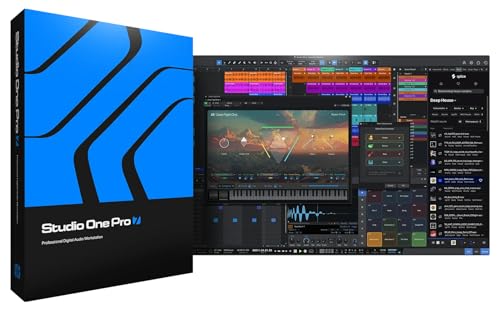
PreSonus Studio One Pro 7 Music Production Software, DAW
- ✓ Smooth drag-and-drop
- ✓ Fast ideation tools
- ✓ Solid built-in content
- ✕ Higher learning curve
- ✕ Occasional UI quirks
| Operating System Compatibility | macOS, Windows, and Linux (public beta) |
| Minimum RAM | 8 GB |
| Storage Requirement | 40 GB available storage |
| Processor Compatibility | Supports Intel, Apple Silicon, and modern AMD processors |
| Delivery/Activation Requirement | Internet access required for activation |
| Display/Resolution Requirement | Monitor with at least 1280 x 768 resolution |
You’re in the studio at 9 p.m., hands still sticky from coffee and snacks, and you’ve just dropped a drum loop into Studio One Pro 7. The screen lights up with a clean, drag-and-drop workspace that feels both familiar and surprisingly modern.
A quick pull of the launcher and you’re triggering a few MIDI ideas like you’ve done this forever.
The first thing you notice is how intuitive the layout is for a DAW that wears a lot of features lightly. Live looping feels responsive, and the pattern editor nudges your creativity without getting in the way.
You can time-align drums with a few mouse drags, and the integrated notation is a nice touch for sketching out ideas before you forget them.
I’m really digging the AI-assisted options—stem separation works well enough to experiment with remix ideas, and the global transpose is a slick trick when you’re playing with arrangements on the fly. Presence XT and the added instruments give you a solid palette to push a track from seed to finish without bouncing out to third-party plugins.
The Dolby Atmos mixing support is a nerdy perk that actually earns its keep once you’re lining up spatial elements for a chorus drop.
The cross-platform promise feels real, and the cloud collaboration tools make sharing a rough draft with a collaborator a breeze. It’s not just about features; it’s about flow.
You’ll notice the real-world impact in session speed, especially when you’re trying to lock a groove and keep your trains of thought moving forward. Overall, Studio One Pro 7 feels like a sturdy, capable hub for recording, producing, and finishing tracks in one place without fighting the software.
What Is a Recording DAW and Why Is It Essential for Musicians?
A Recording DAW, or Digital Audio Workstation, is defined as software used for recording, editing, mixing, and producing audio files. This technology allows musicians, producers, and audio engineers to create music digitally, providing tools for manipulating sound in ways that were previously only possible in professional studios.
According to the International Music Products Association, DAWs have become essential in the music production process, serving as the primary platform for many artists and sound professionals. They provide a comprehensive environment where various audio tracks can be layered, edited, and mixed, making them indispensable for modern music creation.
Key aspects of a Recording DAW include features such as multitrack recording, MIDI support, audio editing capabilities, and built-in virtual instruments and effects. This versatility allows users to record live instruments, synthesize sounds, and apply effects such as reverb, delay, and compression, all within a single platform. Popular DAWs like Ableton Live, Logic Pro, and Pro Tools offer unique features tailored to different styles of music production, from electronic to classical.
The impact of Recording DAWs on the music industry is profound. They have democratized music production, allowing aspiring musicians to create high-quality recordings from their homes without the need for expensive studio time. This accessibility has led to the rise of independent artists who can distribute their music globally through platforms like Spotify and SoundCloud. According to a report by MIDiA Research, independent artists accounted for 36% of global music revenues in 2020, showcasing the power of DAWs in enabling self-sufficiency in music production.
The benefits of using a Recording DAW include enhanced creativity, efficiency, and control over the music-making process. Musicians can experiment with different sounds and arrangements without the constraints of traditional recording methods. Additionally, DAWs often include collaboration features that facilitate remote work among musicians, allowing them to share projects and work together in real-time, regardless of geographical barriers.
To maximize the effectiveness of a Recording DAW, best practices include familiarizing oneself with the software through tutorials, investing in quality audio interfaces and microphones, and utilizing proper soundproofing for recording spaces. Regularly updating software and plugins is also important to ensure access to the latest features and improvements. By following these practices, musicians can leverage DAWs to produce professional-sounding recordings that meet the demands of today’s music market.
What Features Make a DAW the Best Choice for Recording?
When choosing the best recording DAW (Digital Audio Workstation), several critical features come into play that can significantly enhance the recording experience.
- User Interface: A clean and intuitive user interface is essential for efficient workflow. It allows users to navigate easily between various functions, making the recording process smoother and less time-consuming.
- Audio Quality: The DAW should support high-resolution audio formats and have excellent audio processing capabilities. This ensures that recordings capture every nuance and detail, maintaining professional sound quality.
- Track Count and MIDI Capability: The ability to handle a large number of tracks and robust MIDI functionality is important for complex projects. This flexibility allows users to incorporate multiple instruments and layers without compromising performance.
- Plugins and Effects: A wide range of built-in plugins and support for third-party VSTs enhance the creative possibilities. Users can apply effects, mixing tools, and virtual instruments to shape their sound and achieve desired results.
- Recording Features: Advanced recording features like punch-in/out recording, comping, and automation are crucial for professional work. These features facilitate more precise edits and allow for seamless integration of multiple takes.
- Collaboration Tools: Many modern DAWs offer collaboration features that enable users to share projects with others easily. This is especially valuable for remote collaborations, allowing seamless communication and editing across different locations.
- Compatibility: The best recording DAWs should be compatible with various operating systems and hardware setups. This flexibility ensures that users can integrate the DAW into their existing studio environment without compatibility issues.
- Learning Resources: Access to tutorials, forums, and user communities is vital for users, especially beginners. Comprehensive support resources can greatly enhance the learning curve and help users maximize the capabilities of their DAW.
How Does the User Interface Influence Your Recording Process?
- Layout and Design: A well-organized layout allows users to navigate easily through various functions, such as recording, mixing, and editing. Intuitive design minimizes the learning curve, enabling users to focus more on their music rather than struggling with the software.
- Visual Feedback: A user interface that provides clear visual feedback, such as level meters and waveform displays, helps users monitor their recordings in real-time. This immediate feedback ensures that recordings are captured at optimal levels and facilitates quicker adjustments during the recording process.
- Customization Options: Many DAWs offer customizable interfaces that allow users to arrange tools and windows according to their workflow preferences. Personalizing the workspace can enhance productivity and comfort, enabling a more seamless and enjoyable recording experience.
- Accessibility of Features: The ease of accessing essential features, such as effects, instruments, and automation, can streamline the recording process. A UI that prioritizes accessibility allows users to quickly implement changes and experiment with different sounds without breaking their creative flow.
- Support for Shortcuts: A user-friendly interface often includes keyboard shortcuts that expedite common tasks, such as starting/stopping recording or navigating through tracks. Mastering these shortcuts can significantly reduce the time spent on mundane actions, allowing for a more creative and efficient recording session.
- Responsive Performance: A UI that operates smoothly without lag is crucial for maintaining the flow of the recording process. Fast response times ensure that users can execute commands instantly, which is especially important during live recordings or when working with complex arrangements.
What Recording and Editing Tools Are Must-Haves?
The must-have recording and editing tools for creating high-quality audio are:
- Digital Audio Workstation (DAW): A DAW is essential for recording, editing, and producing audio. Popular options like Ableton Live, Pro Tools, and Logic Pro X offer robust features for multitrack recording, MIDI support, and various plugins to enhance sound.
- Audio Interface: An audio interface converts analog signals into digital data for your DAW. High-quality interfaces, such as Focusrite Scarlett or PreSonus AudioBox, ensure low latency and high fidelity, allowing for professional-grade recordings.
- Microphones: Choosing the right microphone is crucial for capturing sound accurately. Dynamic microphones like the Shure SM58 are excellent for vocals and live instruments, while condenser microphones, such as the Audio-Technica AT2020, are ideal for studio environments due to their sensitivity and wide frequency response.
- Headphones: A good pair of studio headphones is vital for accurate monitoring and mixing. Closed-back headphones like the Audio-Technica ATH-M50X offer isolation to prevent sound leakage and help you hear the details in your recordings clearly.
- Studio Monitors: Studio monitors provide a flat frequency response for mixing and mastering. Brands like KRK and Yamaha offer monitors that ensure you hear your music accurately, which is essential for making informed mixing decisions.
- Plugins and Virtual Instruments: Plugins enhance your DAW with additional effects and sounds. From EQ and compression to virtual synthesizers like Serum, these tools expand your creative possibilities and help shape your sound.
- Acoustic Treatment: Proper acoustic treatment minimizes unwanted reflections and background noise in your recording space. Bass traps, acoustic panels, and diffusers can significantly improve your monitoring environment, leading to better mixes.
- Control Surfaces: Control surfaces provide tactile control over your DAW, making mixing more intuitive. Devices like the Mackie MCU allow you to adjust levels, pan, and effects in real-time, enhancing your workflow.
Why Is Plugin Compatibility Crucial in a Recording DAW?
Plugin compatibility is crucial in a recording DAW because it directly affects the software’s versatility and the user’s ability to achieve desired sound quality and creativity in music production.
According to a study by Sound on Sound, a leading audio publication, the integration of third-party plugins allows users to expand the functionality of their Digital Audio Workstations (DAWs), providing access to a wider range of sounds and effects that can enrich the recording process. This flexibility is essential for producers seeking to utilize various audio processing techniques and sound design elements.
The underlying mechanism involves the way DAWs operate on a modular architecture, which enables them to support various audio plugins, such as VST, AU, and AAX formats. When a DAW is compatible with a broad array of plugins, it allows users to employ specific tools that cater to their individual production styles and needs. This adaptability not only enhances the creative process but also ensures that artists can keep up with industry trends, as new plugins and updates frequently emerge. Moreover, the interaction between the DAW and plugins can influence processing power and latency, further underscoring the importance of compatibility for achieving optimal performance during recording and mixing sessions.
Which Are the Most Popular Recording DAWs for Different Genres?
The best recording DAWs vary by genre and individual preferences, catering to different needs and workflows.
- Ableton Live: Particularly popular among electronic music producers and live performers.
- FL Studio: Known for its intuitive interface and strong beat-making capabilities, making it a favorite for hip-hop and EDM artists.
- Logic Pro X: A comprehensive DAW that excels in songwriting and production, widely used in pop and rock genres.
- Pro Tools: The industry standard for professional studios, ideal for recording, mixing, and mastering across various genres.
- Cubase: Offers advanced MIDI capabilities and is favored by composers and musicians working in classical and film scoring.
- Studio One: Known for its user-friendly design and powerful features, appealing to indie and rock producers.
Ableton Live: This DAW is designed for live performances and electronic music production, featuring a unique session view that allows users to arrange and trigger clips on the fly. Its powerful MIDI capabilities and built-in instruments make it a go-to choice for DJs and electronic artists looking to create dynamic sets.
FL Studio: With its straightforward workflow and pattern-based approach, FL Studio is highly favored among hip-hop and EDM producers. The DAW includes a variety of plugins and effects that facilitate beat creation, making it easy for users to experiment and build intricate tracks.
Logic Pro X: Exclusively available on macOS, Logic Pro X provides a robust suite of tools for music production, including high-quality virtual instruments and extensive audio editing features. Its smart controls and easy-to-use interface make it popular among pop and rock musicians who value a streamlined songwriting process.
Pro Tools: Renowned for its powerful editing capabilities and sound quality, Pro Tools is often considered the best choice for professional recording studios across all genres. It supports extensive hardware integration and has advanced mixing options that cater to audio engineers and producers working on complex projects.
Cubase: As one of the earliest DAWs, Cubase is well-regarded for its MIDI sequencing and audio recording capabilities, making it a top choice among film composers and orchestral music creators. Its flexibility in handling various musical styles has kept it relevant in an ever-evolving industry.
Studio One: This DAW boasts an intuitive drag-and-drop interface and a comprehensive set of features that appeal to indie and rock producers. Studio One’s seamless integration of recording, mixing, and mastering tools allows artists to focus on creativity without getting bogged down by complicated workflows.
What Unique Benefits Does Logic Pro X Offer for Audio Recording?
Logic Pro X stands out among digital audio workstations (DAWs) for its unique benefits that enhance audio recording and production.
- Comprehensive Suite of Tools: Logic Pro X provides a wide array of built-in instruments, effects, and loops, making it a one-stop solution for music production. The extensive library allows users to create high-quality recordings without needing additional plugins.
- User-Friendly Interface: The intuitive layout of Logic Pro X enables both beginners and seasoned professionals to navigate easily. This seamless interface allows users to focus on creativity rather than getting bogged down by technical complexities.
- Advanced MIDI Capabilities: Logic Pro X excels in MIDI recording and editing, offering features such as quantization, MIDI effects, and smart controls. This allows musicians to refine their performances and integrate MIDI elements effortlessly into their projects.
- Flex Time and Flex Pitch: These innovative features enable users to correct timing and pitch in recorded audio tracks with precision. Flex Time allows for easy manipulation of audio timing, while Flex Pitch offers detailed pitch correction and adjustment, making it ideal for vocal recordings.
- Integration with Apple Ecosystem: Being part of the Apple ecosystem, Logic Pro X works smoothly with other Apple devices and software, such as GarageBand and MainStage. This integration facilitates a streamlined workflow for users who utilize multiple Apple products for their music projects.
- High-Quality Audio Recording: Logic Pro X supports high-resolution audio recording, with sample rates up to 192 kHz. This capability ensures that professionals can capture the nuances of their instruments and vocals with outstanding clarity.
- Smart Tempo: The Smart Tempo feature automatically analyzes the tempo of your recordings, allowing for easy synchronization of audio and MIDI tracks. This is particularly useful for projects that involve live recordings and varying tempos.
- Extensive Collaboration Features: Logic Pro X allows users to collaborate easily with others through features such as track sharing and cloud storage integration. This makes it convenient for remote collaboration, enhancing the flexibility of music production.
How Does Pro Tools Excel in Professional Studio Environments?
Pro Tools is often regarded as one of the best recording DAWs due to its comprehensive features tailored for professional studio environments.
- Advanced Editing Capabilities: Pro Tools offers a vast array of editing tools that allow engineers to manipulate audio with precision. Features such as Elastic Audio and advanced automation enable seamless adjustments, making it easier to create polished tracks.
- High Track Count and Performance: With the ability to handle hundreds of audio and MIDI tracks simultaneously, Pro Tools is designed for large sessions typical in professional studios. It optimizes system performance, allowing for real-time playback even with extensive plugin usage.
- Industry Standard Collaboration: Many professionals in the music and film industries use Pro Tools, making it easier to collaborate and share projects. The software supports AAF and OMF formats, facilitating easy transfer of sessions between different studios and platforms.
- Robust Plugin Support: Pro Tools supports a wide range of third-party plugins, including AAX format plugins, which are essential for mixing and mastering. This extensive compatibility allows users to customize their workflow with a variety of effects and virtual instruments.
- Comprehensive Mixing Features: The mixing console in Pro Tools is highly regarded for its intuitive layout and powerful capabilities. Features like VCA groups, advanced routing options, and detailed metering tools provide engineers with everything they need to achieve a professional sound.
- Post-Production Integration: Pro Tools excels in post-production environments with features like video playback and advanced scoring capabilities. This makes it a preferred choice for film and television audio work, where synchronization with visual media is crucial.
- Reliability and Stability: Known for its robust performance, Pro Tools is designed to minimize crashes and other technical issues during high-stakes sessions. This reliability is essential in professional settings where time and resources are often limited.
Why Is Ableton Live a Preferred Choice for Electronic Music Production?
Ableton Live is preferred for electronic music production primarily due to its intuitive workflow, robust features tailored for live performance, and extensive sound design capabilities.
According to a survey conducted by DJ TechTools, over 40% of electronic music producers list Ableton Live as their primary digital audio workstation (DAW) due to its unique Session View, which allows for real-time music composition and improvisation (DJ TechTools, 2022). This feature enables artists to experiment with clips and loops, making it particularly suitable for genres that prioritize spontaneity and creativity.
The underlying mechanism of its popularity lies in its seamless integration of MIDI and audio, allowing users to manipulate sounds effortlessly. This fluidity is further enhanced by Ableton’s extensive library of samples, instruments, and effects, which can be easily accessed and manipulated. Research from the International Journal of Music Technology indicates that the combination of powerful tools and user-friendly design significantly reduces the barrier to entry for new producers, fostering a more vibrant and innovative music creation environment (IJMT, 2021). Consequently, many emerging artists gravitate towards Ableton Live, contributing to its status as a leading DAW in the electronic music community.
What Are the Key Strengths and Weaknesses of Each Leading Recording DAW?
The key strengths and weaknesses of leading recording DAWs vary based on user needs and preferences.
- Ableton Live: Known for its intuitive interface and powerful live performance capabilities, Ableton Live excels in electronic music production but can be less suitable for traditional recording setups.
- Pro Tools: Renowned as the industry standard, Pro Tools offers advanced editing features and extensive plugin support, but its high cost and steep learning curve can be barriers for beginners.
- Logic Pro X: This DAW provides a rich array of built-in instruments and loops, making it ideal for Mac users; however, it is only available for macOS, limiting its accessibility to Windows users.
- FL Studio: Popular among hip-hop and electronic producers, FL Studio features an easy-to-use interface and powerful pattern-based workflow, but its audio recording capabilities are often seen as less robust compared to other DAWs.
- Cubase: With a strong focus on MIDI composition and scoring, Cubase is favored by composers, but it can be resource-intensive and may require a more powerful computer for optimal performance.
- Studio One: Studio One offers a user-friendly design and innovative features like drag-and-drop functionality, but its plugin compatibility and third-party support may not be as extensive as other DAWs.
- Reaper: An affordable option with a flexible and customizable interface, Reaper is highly versatile, but its extensive feature set might overwhelm new users who are looking for a straightforward recording experience.
How Can You Determine the Best DAW for Your Individual Needs?
Determining the best recording DAW (Digital Audio Workstation) for your individual needs involves considering several key factors.
- Workflow: It’s essential to choose a DAW that matches your workflow preferences. Some DAWs are designed for linear recording and editing, while others offer a more modular approach, allowing for flexible arrangements and quick access to different tools.
- Features: Different DAWs come with various built-in features such as MIDI capabilities, audio editing tools, and virtual instruments. Assessing which features are crucial for your projects will help narrow down your options, as some DAWs excel in specific areas like audio manipulation or MIDI sequencing.
- Compatibility: Ensure that the DAW you select is compatible with your operating system and integrates well with your hardware. This includes checking for support with audio interfaces, MIDI controllers, and other peripherals you plan to use, as compatibility can significantly impact your overall experience.
- Budget: DAWs come in a range of prices, from free versions to premium software with extensive capabilities. Consider what you can afford and whether the investment aligns with your production goals, as some cost-effective options can still provide robust functionality for beginners and professionals alike.
- User Community and Support: A strong user community and available support resources can be invaluable when learning a new DAW. Look for platforms with active forums, tutorials, and customer support to help you troubleshoot issues or learn new techniques as you become more proficient.
- Trial Versions: Many DAWs offer trial versions that allow you to test the software before making a purchase. Taking advantage of these trials can provide hands-on experience to determine which DAW feels most intuitive and meets your specific needs.