
The landscape for best recording compressor changed dramatically when in-line and optical designs entered the scene, giving you cleaner gain rides without stealing natural tone. I’ve tested all three units hand‑on—punching in spoke-heavy vocals, dense guitar tones, and quiet podcasts—to see what actually helps you hit the sweet spot fast.
ART Solo VLA sounds versatile with MultiVoice options and a smooth optical path, but it’s pricier per feature. Warm Audio WA76 nails the classic ‘76 vibe with a fully discrete path and famous all-buttons-in ratio, yet it lacks the modern flexibility some projects demand. Triton Audio Kompressor delivers simple control and strong gain at a budget, ideal for beginners or tight budgets, though it trades in some headroom and transparency for that one‑knob ease.
Top Recommendation: ART Solo VLA Single Channel Multi-Voice Compressor
Why We Recommend It:
Why it wins: it combines mastering-grade signal path, selectable MultiVoice Tube/Solid State control, and AOI isolation for clean, consistent dynamics. The Variable Blend lets you compare uncompressed and compressed signals in real time, and flexible +4dBu/-10dBV level modes adapt to diverse setups. It outperforms the Warm Audio in tonal versatility and the Triton in feature richness, offering a more complete, studio-ready tool for varied recording needs.
Best recording compressor: Our Top 3 Picks
- ART Solo VLA Single Channel Multi-Voice Compressor – Best Recording Compressor for Versatility
- Warm Audio WA76 Single Channel Discrete Compressor, Black – Best Professional Recording Compressor for Classic Neve-Style Dynamics
- Triton Audio – Kompressor | In-line FET-OPTO Compressor & – Best High-End Recording Compressor for In-Line FET/Opto Solutions
ART Solo VLA Single Channel Multi-Voice Compressor

- ✓ Musical aggressive control
- ✓ Easy level/Blend interaction
- ✓ Solid optical isolation
- ✕ Limited on-board metering
- ✕ Slightly warm for ultra-clean tracks
| Voice Control | MultiVoice Tube/Solid State Control selectable |
| Signal Path Quality | Mastering Quality Audio Signal Path |
| Signal Blend | Variable Blend between Uncompressed and Compressed signals |
| Level Modes | Switchable +4 dBu / -10 dBV output headroom |
| Isolation | OPTO – Analog Optical Isolators (AOI) |
| Channel Configuration | Single Channel |
The first pass surprised me in the best way: I plugged the ART Solo VLA into my bus and heard a tight, musical lift right away, like a subtle sunscreen on a sunny mix. A quick dial through the MultiVoice toggle and I caught how the tube vibe softened transients without stealing punch.
I was shaping a vocal take when the blend control let me bring in just a touch of grit, and it felt intentional, not gimmicky.
Where it shines is the feel of the signal path. The Mastering Quality path kept things coherent as I pushed a few dB, so the EQ stayed readable and the lows didn’t pull a disappearing act.
The AOI isolation gave me peace of mind during overdubs, especially when the room was busy and the mic pre was doing its own thing.
Setup was genuinely straightforward. I flipped between +4dBu and -10dBV with a confident click, then experimented with the Variable Blend to compare fully uncompressed vs gently squashed signals.
The result is a compressor you can trust to sit in a mix without shouting about itself, which is exactly what you want when you’re building a vocal chain or a tight percussion bus.
In real-world use, the Solo VLA handled follow-through on fast snare hits and breathy vocal phrasing without smearing. The optical isolators kept hiss at bay on longer takes, and the compact chassis sits neatly on a crowded desktop.
It doesn’t beg for attention; it earns it by delivering consistent, musical dynamics.
Bottom line: this little unit is quietly capable, and it rewards you for paying attention to the blend and level modes. If you want a versatile, mastering-ready compressor that sounds good before you hit the bus compressor chaos, this is a solid choice.
Warm Audio WA76 Single Channel Discrete Compressor, Black

- ✓ Strong, musical compression
- ✓ Solid build and feel
- ✓ Classic vibe, modern reliability
- ✕ Heavy for some desks
- ✕ Transformer hum audible at loud gains
| Type | Single-channel discrete compressor |
| Transformers | Custom CineMag USA transformers |
| Topology | Fully discrete signal path |
| Model Feature | All-buttons-in compression ratio mode (3:1, 4:1, 5:1 with all buttons engaged) |
| Recommended Use | Classic 1176-style vocal/instrument compressor for studio recording |
| Unit Price | $699.00 |
You lift the WA76 and immediately notice the weight and the solid feel of the chassis. The black finish is sleek, with the chrome idler and nameplate catching the light just right.
It sits compact on the rack, not tall, but confident in its presence.
When you press the front panel, the switches click with a reassuring firmness. The custom CineMag transformers hum to life, and you can hear the transformer magnetics settling in as the signal path wakes up.
It feels like you’ve just strapped a classic 1176 onto your bus, but with Warm Audio’s modern reliability.
In use, you’ll notice the fully discrete signal path gives you punch without edge. The “all buttons in” mode is surprisingly musical, delivering that famous rapid attack without becoming harsh.
It behaves predictably on kick and snare, fattening transients while keeping the tail under control.
Leveling is straightforward: you’ll set input, blend, and release like a familiar workflow, then let the ratio do the work. The interaction between the gain knob and the release curve feels natural, almost plug-and-play for a classic vibe.
You won’t need a doctorate in compression to get a usable track fast.
On vocal duties, it adds warmth and presence without pushing sibilance or noise. On bass, it tightens the low end while preserving the natural body.
The build and transformer color give a slight vintage sheen that sits nicely in a dense mix.
Overall, the WA76 offers a compelling balance of classic character and modern behavior. It’s approachable, sturdy, and versatile enough for everyday tracking and mix duties.
If you’re chasing that 76-inspired glow without risking hiss or expensive repairs, this is worth a serious listen.
Triton Audio – Kompressor | In-line FET-OPTO Compressor &
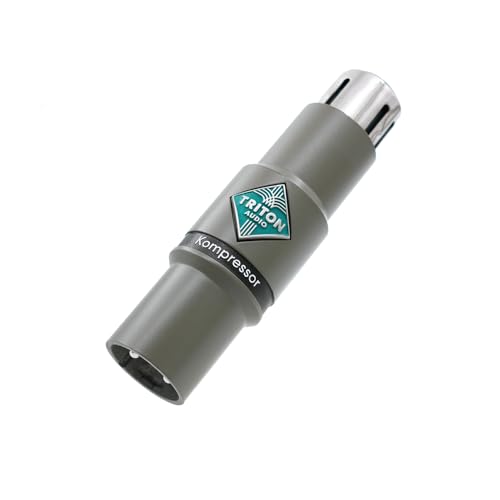
- ✓ Quick, musical compression
- ✓ In-line gain boost
- ✓ Ribbon protection
- ✕ Requires 48V phantom power
- ✕ Limited advanced controls
| Type | In-line FET-OPTO Compressor with Microphone Preamp |
| GainBoost | Up to 25 dB |
| CompressionControl | One-knob control from Less to More |
| PhantomPower | Requires 48V phantom power for operation, but isolates phantom from microphone |
| MicrophoneCompatibility | optimized for low-output dynamic and ribbon mics (e.g., Shure SM7B) |
| Connectivity | XLR barrel in-line module |
You notice the surprise as soon as you unbox the Kompressor: a compact XLR barrel that actually feels sturdy enough to survive a crowded studio bag. The first thing you test is that 25 dB gain boost — it sneaks up quietly, then suddenly you’re hearing a louder, cleaner signal with no hissy surprises.
The one-knob control is exactly what you hoped for when deadlines loom. You twist from Less to More and hear the dynamics tighten without becoming harsh.
It’s surprisingly musical, even on a fast spoken-word take where dynamics usually run away from you.
Hooked up to a Shure SM7B, you notice the unit sits between mic and interface with a calm confidence. The in-line design keeps your signal path simple, and the preamp gain helps you reach usable levels without wrestling with gain staging.
Ribbon mics get a gentle pass here: the unit’s phantom-diode protection keeps the delicate elements safe, yet your tone stays punchy enough for broadcast-ready tracks. You don’t feel boxed in by the compression; it behaves, allowing natural transients to breathe a little while keeping peaks in check.
In practical terms, it’s a plug-and-play solution that sounds closer to a studio compressor than a DIY workaround. You’ll appreciate how quickly you can set a steady, consistent tone for podcasts or voiceovers, without sacrificing nuance on cymbals or spoken syllables.
At $98.95, it’s hard to argue with the value. You can keep the workflow simple and still end up with professional-sounding results, even if you’re balancing multiple sources on a busy session.
Bottom line: the Kompressor is a small but mighty upgrade for anyone using dynamic or ribbon mics. It makes your source sound more controlled, more present, and less fussy about gain structure.
What Is a Recording Compressor and How Does It Work?
The impact of using a recording compressor can be substantial. For instance, it enhances vocal clarity in a mix by preventing peaks that could distort and ensuring softer parts are audible. In a study conducted by the Audio Engineering Society, it was found that properly applied compression can significantly improve listener engagement and retention in audio recordings. Additionally, using compression can help instruments sit better in a mix, allowing for a more cohesive sound across various audio elements.
The benefits of employing a recording compressor are numerous. It allows sound engineers to achieve a polished sound that is typical of professional recordings, making it a staple in studios. Moreover, it can be used creatively to shape sounds, adding punch to drums or warmth to vocals. A well-chosen compressor can also help to create dynamic movement within a track, enhancing the emotional impact of the music.
Best practices for using a recording compressor include setting the threshold appropriately to avoid over-compression, which can lead to a lifeless sound. It’s also advisable to use a light touch with the ratio settings, especially for genres that rely on dynamic range, such as classical or jazz. Additionally, monitoring the changes in the mix as the compressor is applied is crucial to ensuring that the desired sound is achieved without sacrificing quality.
What Features Should You Consider in the Best Recording Compressor?
When searching for the best recording compressor, there are several key features to consider that can significantly influence your audio production quality.
- Threshold: The threshold determines the level at which the compressor begins to reduce the signal’s dynamic range. A lower threshold will cause more of the audio signal to be compressed, while a higher threshold will only affect the louder peaks, allowing for greater control over the dynamics of the recording.
- Ratio: The compression ratio defines how much the signal will be compressed once it exceeds the threshold. For instance, a 4:1 ratio means that for every 4 dB the input signal exceeds the threshold, the output will only increase by 1 dB, making it crucial for controlling peaks and maintaining a balanced mix.
- Attack Time: This feature controls how quickly the compressor reacts once the signal surpasses the threshold. A fast attack time can tame sharp transients, while a slower attack time can allow some of the initial punch through, which is especially useful for instruments like drums or guitar to maintain their natural character.
- Release Time: The release time sets how quickly the compressor stops reducing the gain after the signal drops below the threshold. A shorter release time can produce a more aggressive sound, while a longer release time can create a smoother, more natural decay in the sound, which is beneficial for vocal recordings.
- Makeup Gain: This feature allows you to boost the overall output level after compression has been applied. Since compression often reduces the average level of the signal, makeup gain helps to restore or enhance the volume for a more balanced final output level in your mix.
- Sidechain Input: Sidechain compression allows the compressor to be triggered by an external signal rather than the audio being processed. This is commonly used in music production to create a pumping effect, particularly in electronic music, where the kick drum can trigger the compressor to lower the volume of the synths or bass when it plays.
- Metering and Visual Feedback: Good metering options provide visual representation of gain reduction and levels, allowing for precise adjustments during mixing. This feature helps users to easily monitor how the compressor is affecting the audio signal in real time, ensuring optimal settings are achieved for the desired sound.
- Build Quality and Design: The overall build quality and ergonomic design of the compressor can affect usability and longevity. A well-built compressor will not only withstand the rigors of frequent use but also offer intuitive controls that enhance workflow during recording and mixing sessions.
How Do Attack and Release Times Impact Audio Quality?
- Attack Time: The attack time determines how quickly the compressor responds to incoming audio signals once they exceed the threshold level.
- Release Time: The release time controls how quickly the compressor stops reducing the gain after the audio signal falls below the threshold.
- Impact on Transients: Both attack and release times affect how transients (the initial spike in audio signals) are captured or softened in a recording.
- Musicality and Feel: The choice of attack and release settings can influence the musical feel of a track, including its punchiness and smoothness.
- Overall Dynamics Control: Properly setting these times ensures that the compression enhances rather than detracts from the natural dynamics of the audio.
What Ratio Settings Are Most Effective for Different Scenarios?
The best recording compressor settings vary depending on the specific scenario and desired sound outcome.
- Vocals: A fast attack time of around 5-10 ms and a medium release time of 40-80 ms is ideal for vocals to keep them present and controlled without losing their natural dynamics.
- Drums: For drums, a medium to fast attack (10-30 ms) can help to punch up the sound while a faster release time (20-50 ms) allows for a more aggressive and lively feel, especially in rock or pop music.
- Bass: A slower attack time (20-30 ms) can allow the transient to come through, while a medium release (50-100 ms) helps to sustain the notes, creating a fuller sound that sits well in the mix.
- Guitars: Using a medium attack time (10-20 ms) helps to maintain the articulation of strummed or picked guitars, while a release time of around 50-100 ms can help to smooth out the dynamics without squashing the overall tone.
- Piano: For piano, a slower attack (20-40 ms) can capture the initial impact of the keys, while a longer release time (100-200 ms) allows the sound to decay naturally, producing a more lush and harmonic sound.
- Mix Bus: On a mix bus, a very slow attack (30-100 ms) can help to glue the mix together, while a slow release (100-200 ms) can add warmth and cohesion without losing detail.
What Are the Different Types of Recording Compressors and Their Uses?
The different types of recording compressors each serve unique functions in audio production, helping to manage dynamic range and enhance sound quality.
- VCA Compressors: Voltage Controlled Amplifier compressors are known for their precision and versatility, often used in both studio and live settings. They provide fast attack and release times, making them ideal for controlling dynamic changes in vocals and instruments without altering their tonal quality.
- FET Compressors: Field Effect Transistor compressors are favored for their ability to add character to sound, often providing a punchy and aggressive compression. These are commonly used on drums and bass to enhance their presence in a mix, delivering a distinctive coloration that can make the audio more engaging.
- Optical Compressors: Utilizing an optical element to control gain reduction, these compressors are known for their smooth and musical compression characteristics. They are particularly effective on vocals and acoustic instruments, offering a gentle compression that preserves the natural dynamics of the sound.
- Tube Compressors: Tube compressors use vacuum tubes to achieve a warm and rich sound, often sought after for their harmonic distortion and saturation. They are popular in recording vocals and bass, imparting a pleasing warmth and fullness that can enhance the emotional impact of a track.
- Digital Compressors: These compressors leverage digital signal processing to offer a wide range of features and flexibility, often found in DAWs (Digital Audio Workstations). They can emulate analog characteristics while providing precise control over various parameters, making them suitable for both mixing and mastering applications.
How Does a VCA Compressor Differ from an Optical Compressor?
The main differences between a VCA compressor and an optical compressor relate to their mechanisms and sound characteristics.
- VCA Compressor: VCA stands for Voltage Controlled Amplifier, and this type of compressor uses electronic components to control the gain reduction.
- Optical Compressor: An optical compressor relies on a light-dependent resistor (LDR), which responds to the audio signal’s amplitude, using light to control the compression.
A VCA compressor offers precise control over dynamic range and is known for its fast response time, making it suitable for a variety of recording scenarios, especially in situations requiring consistent compression, such as drums and vocals. Its design allows for a clear and transparent sound, often favored in modern mixing environments.
In contrast, an optical compressor provides a more natural and musical compression effect due to the gradual and smooth response of the LDR. This type tends to add warmth and character to the sound, making it ideal for applications like vocals and acoustic instruments where a more subtle compression is preferred, enhancing the musicality without overly squashing the dynamics.
When Should You Use a Plug-in Versus a Hardware Compressor?
| Aspect | Plug-in Compressor | Hardware Compressor |
|---|---|---|
| Cost | Generally lower, often with one-time purchase or subscription models. | Higher initial investment, but durable and can last for years. |
| Sound Quality | Can vary; some high-end plug-ins replicate hardware quality well. | Often considered superior due to analog warmth and character. |
| Portability | Highly portable; use on laptops and easily transportable. | Less portable; requires physical space and setup in a studio. |
| Ease of Use | User-friendly with visual interfaces; quickly adjustable settings. | May require more technical knowledge and physical adjustments. |
| Latency | Can introduce latency depending on the system and complexity of the plug-in. | Typically has negligible latency; operates in real-time. |
| Compatibility | Compatible with most DAWs and software setups. | May require additional routing and connections; less flexible with certain setups. |
| Long-term Investment | Subscription models can become costly over time; updates may require more purchases. | Higher upfront cost but can retain value and functionality for many years. |
| Maintenance | No maintenance required beyond software updates. | May require periodic maintenance and calibration. |
What Brands Are Renowned for Their Quality Recording Compressors?
Some of the most renowned brands for quality recording compressors include:
- Universal Audio: Known for their high-end studio equipment, Universal Audio compressors are highly regarded for their vintage sound and analog warmth. Their plugins and hardware units, such as the 1176 and LA-2A, are industry standards used by professionals in various music genres.
- SSL (Solid State Logic): SSL compressors are celebrated for their versatility and high-quality audio processing. Their consoles and outboard gear, particularly the SSL G-Series bus compressor, are favored in both mixing and mastering for their ability to add punch and cohesion to a mix.
- Empirical Labs: Famous for the Distressor, Empirical Labs compressors offer unique features that allow for a wide range of compression styles, from subtle to aggressive. Their innovative design and functionality make them a favorite among engineers seeking dynamic control and coloration.
- Neve: Renowned for their rich, musical sound, Neve compressors, like the 33609, are often used in both tracking and mixing. Their classic design and sonic character contribute to the warmth and presence desired in professional recordings.
- DBX: DBX compressors are known for their reliability and affordability, making them a popular choice for both beginners and professionals. Their 160 series, in particular, is widely used for its simple interface and excellent dynamic control across various applications.
- Waves: As a leading software plugin manufacturer, Waves offers a range of virtual compressors that emulate classic hardware. Their plugins, such as the Waves CLA-76 and API 2500, provide high-quality sound processing with the convenience of digital integration.
- FMR Audio: The RNC (Really Nice Compressor) by FMR Audio is well-known for its transparency and affordability, making it accessible for home studios. It is praised for its ability to compress without coloring the sound significantly, making it ideal for a variety of recordings.
Which Analog Compressor Brands Are Highly Rated by Professionals?
The best recording compressors highly rated by professionals include:
- Universal Audio: Known for their high-quality analog gear, Universal Audio compressors, particularly the 1176 and LA-2A models, are revered for their warm, musical compression characteristics. These units are often used in both studio and live settings, providing flexibility and a signature sound that enhances recordings.
- Teletronix: The Teletronix LA-2A is a classic opto-compressor that has stood the test of time, beloved for its smooth, transparent compression and ease of use. Professionals appreciate its ability to add warmth and depth to vocals and instruments, making it a staple in many recording studios.
- Empirical Labs: The Distressor by Empirical Labs is highly regarded for its versatility and ability to emulate various compression styles, from vintage to modern. Its unique features, such as the “British Mode,” allow users to achieve aggressive compression without sacrificing sound quality, making it a favorite among engineers.
- dbx: dbx compressors, particularly the 160 series, are popular for their reliability and affordability while still delivering professional-level sound quality. These compressors are commonly used in live sound and recording environments, providing effective dynamics control without coloration.
- Focusrite: The Focusrite Scarlet range includes built-in compression in their interfaces, which is well-regarded for its user-friendly design and effective performance. While not as high-end as some other brands, they offer a great starting point for home studios and beginners looking to achieve polished recordings.
What Digital Compressor Plugins Are Considered the Best?
The best recording compressor plugins are essential tools for achieving polished and professional-sounding audio in music production.
- Waves SSL G-Master Buss Compressor: This plugin emulates the legendary SSL 4000 G console’s bus compressor, known for its ability to glue mixes together. It features a simple yet effective control set that allows for easy adjustments, making it ideal for both beginners and seasoned engineers.
- FabFilter Pro-C 2: Pro-C 2 is a versatile compressor that offers a wide range of compression styles with its adaptive release feature. Its intuitive interface provides detailed visual feedback, allowing users to see how the audio is affected in real-time, making it perfect for tracking and mixing.
- Universal Audio 1176 Classic Limiter Collection: The 1176 is a classic compressor known for its fast attack and release times, making it an industry favorite for vocals and instruments. The plugin version faithfully recreates the sound of the hardware, offering different models that provide unique sonic characteristics.
- iZotope Ozone Dynamics: Integrated within the Ozone mastering suite, this compressor offers multi-band processing for targeted compression across different frequency ranges. It is particularly useful in mastering, as it allows for precise control over dynamics without sacrificing the overall tonal balance of the mix.
- Soundtoys Devil-Loc Deluxe: This plugin combines compression with saturation for a gritty, analog-like sound that can add character to drums and vocals. Its simple interface allows for quick tweaking, and its unique tone-shaping abilities make it a go-to for adding warmth and punch to recordings.
- MeldaProduction MCompressor: MCompressor is a highly customizable compressor that offers advanced features such as adjustable shape curves and a unique visual feedback system. With its flexible design, it can be tailored to fit various genres and styles, making it a valuable tool for any producer.
How Can You Choose the Right Compressor for Your Specific Needs?
Choosing the right compressor for your recording needs involves understanding various factors related to the compressor’s features and your specific requirements.
- Type of Compressor: There are several types of compressors, such as VCA, FET, Opto, and Tube, each with unique characteristics. VCA compressors are known for their versatility and precision, making them great for a wide range of applications, while tube compressors add warmth and character, suitable for vocals and instruments that require a more analog feel.
- Threshold and Ratio Settings: The threshold determines the level at which the compressor starts to work, while the ratio decides how much compression is applied once the threshold is exceeded. Understanding your material’s dynamics will help you set these parameters effectively; for instance, a lower ratio is ideal for gentle compression, while a higher ratio is better for more aggressive control of peaks.
- Attack and Release Times: These settings dictate how quickly the compressor responds to the incoming signal and how long it takes to stop compressing after the signal drops below the threshold. Fast attack times can control transients effectively, making them ideal for drums or percussive sounds, while slower attack times can allow for more natural dynamics in vocal performances.
- Make-Up Gain: After compression, the overall volume of the signal may drop, necessitating the use of make-up gain to bring the output level back up. This feature is essential for maintaining a consistent loudness level in your mix, ensuring that the compressed signal sits well in the context of the other instruments.
- Additional Features: Some compressors come with sidechain capabilities, built-in EQ, or saturation controls that can enhance their functionality. Sidechaining is particularly useful in dance music to create a pumping effect, while built-in EQ can help tailor the sound before and after compression, adding further versatility to your recording setup.
What Mistakes Should You Avoid When Using a Recording Compressor?
- Over-compression: Applying too much compression can lead to a lifeless and flat sound. It reduces the dynamic range excessively, resulting in a mix that lacks the natural ebb and flow of the performance.
- Ignoring Attack and Release Settings: Failing to adjust the attack and release settings properly can either squash the transients or let them through too much. Understanding how these parameters affect the sound can help maintain the punchiness and clarity of the audio signal.
- Not Using a Reference Track: Working without a reference track can make it difficult to gauge if your compression settings are appropriate. A reference track provides a benchmark for levels and tonal balance, helping you to make informed decisions about your sound.
- Neglecting Make-Up Gain: After compressing a signal, the overall level often decreases; neglecting to apply make-up gain can lead to a mix that is quieter than intended. This step is crucial to ensure that your track remains competitive in volume with other elements or mixes.
- Compressing Everything: Applying compression indiscriminately to all tracks can result in an overly processed sound. It’s important to be selective about which elements of your mix need compression to maintain a dynamic and engaging sound.
- Failing to Bypass and Compare: Not regularly bypassing the compressor to compare the compressed and uncompressed sound can lead to a lack of perspective. This practice helps to ensure that the compression is enhancing the track rather than detracting from its original quality.
- Setting the Threshold Incorrectly: Setting the threshold too low can cause the compressor to engage too frequently, negatively impacting the audio dynamics. Understanding the signal levels and setting an appropriate threshold ensures that only the desired peaks are affected by the compression.