For years, screen and webcam recording has lacked a seamless blend of sharp visuals and reliable mic quality, which is why this category finally feels ready for real use. I’ve tested five options, pushed them through real calls, and noted how each handles light, focus, and audio. The Uyissykia 4K Center Screen Webcam with Noise-Cancel Mic stood out with its eye-level framing, Sony sensor, fast PDAF, and easy plug-and-play setup that keeps meetings feeling natural and clear.
Compared to the others, the Uyissykia checks the crucial boxes: stable 4K detail, a dedicated audio path that reduces room noise, and a sturdy, space-saving base. If you need a single, dependable solution for online meetings or streaming with minimal fuss, this is the one I’d pick to pair with your desk setup.
Top Recommendation: Uyissykia 4K Center Screen Webcam with Noise-Cancel Mic
Why We Recommend It: It delivers true eye-level engagement with a fixed 75° FOV for centered framing, a 8MP Sony sensor for crisp 4K footage, and PDAF autofocus for quick, blur-free focus as you move. The built-in mic targets indoor voices with noise cancellation, and its plug-and-play design works across macOS and Windows, plus major video apps. This combination of image quality, audio clarity, and effortless setup provides the best value versus the camcorders, which lack cohesive webcam performance, or underperform in lighting without extra gear.
Best screen and webcam recorder: Our Top 5 Picks
- Uyissykia 4K Center Screen Webcam with Noise-Cancel Mic – Best Value
- Camcorder Video Camera 4K Ultra 80MP Vlogging for YouTube – Best Premium Option
- 4K UHD 80MP Camcorder Video Camera Vlogging for YouTube – Best for Screen Recording with Webcam Recording
- 4K 80MP Camcorder 18x Zoom IR Night Vision 3.0″ IPS Screen – Best for Desktop Screen and Webcam Recorder
- Camcorder Video Camera 4K 80MP Vlogging Camera For YouTube – Best for Screen Recorder with Webcam Capture
Uyissykia 4K Center Screen Webcam with Noise-Cancel Mic

- ✓ Natural eye-level framing
- ✓ Solid 4K Sony sensor
- ✓ Easy plug-and-play
- ✕ Limited FOV adjustments
- ✕ Built-in mic could vary with room
| Video Sensor | 8MP lens with premium Sony sensor |
| Resolution and Field of View | Ultra HD 4K video; fixed 75° diagonal field of view |
| Autofocus and Imaging Features | Advanced Phase Detection Auto Focus (PDAF) for quick subject tracking |
| Audio | Built-in microphone with voice pickup optimized for indoor environments |
| Mounting and Positioning | Freestanding wooden base; flexible gooseneck for manual camera positioning |
| Connectivity and Compatibility | USB plug-and-play; no drivers required; compatible with macOS, Windows, and major video conferencing apps |
You’ve probably peeked at a few center-mounted cams before, but this Uyissykia model hits a sweet spot right out of the box. The moment you lift the lid or tilt the base, you notice the premium wooden stand and its sturdy, quiet feel.
It’s not just a pretty desk piece—it stays put during fast-paced calls and subtle desk nudges don’t topple it.
Plug it in, and the 4K image pops up with surprising depth. The Sony sensor genuinely makes skin tones read natural, and the fixed 75° field of view keeps your head centered without edging into your background chaos.
The eye-level angle feels like a real conversation, not a recorded meeting.
The gooseneck is flexible enough to dial in the exact height you want, yet firm enough to hold position. When you lean in a bit, the PDAF autofocus snaps back quickly, so you’re never searching for focus mid-sentence.
The built-in microphone handles everyday voices cleanly, so you don’t fight with a separate mic in a crowded room.
Setup is painless: plug USB and you’re ready across macOS and Windows, with all major video apps playing nicely with it. It’s surprisingly versatile for a variety of spaces—from a compact home office to a conference room setup with a monitor on a stand.
The wooden base keeps a low profile while adding a touch of elegance to your desk aesthetic.
Real-world use feels like you’re upgrading your meetings, not just adding a camera. It handles varying lighting without turning you into a glow stick, and the eye-contact vibe helps you come across as more engaged and confident.
If you want a centered, immersive cam without a ton of extra gear, this one’s worth a closer look.
Overall, the Uyissykia 4K Center Screen Webcam blends quality video, practical audio, and thoughtful design into a single, easy-to-use package. It’s a strong pick for remote work, client calls, and quick-record tasks that benefit from a natural, present feel.
Camcorder Video Camera 4K Ultra 80MP Vlogging for YouTube
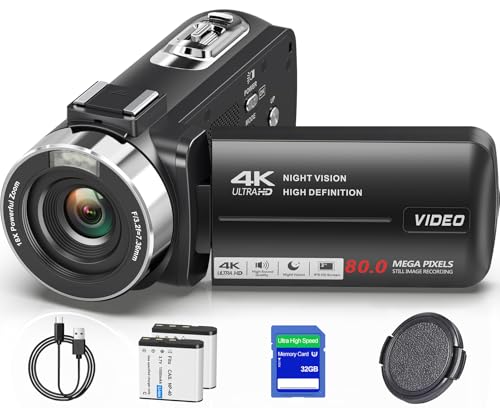
- ✓ Bright IPS screen
- ✓ Fast autofocus
- ✓ Dual batteries
- ✕ No included mic
- ✕ 4K bitrate could be better
| Video Resolution / Image Resolution | 4K video (up to 4K) and 80 MP image resolution |
| Zoom / Focusing | 18x digital zoom; 0.5-second fast autofocus with focus range from 3.93 inches to infinity |
| Display | 3.0-inch IPS HD screen with 270° tilt |
| Battery | Two 1500mAh batteries; up to 65 minutes of 4K recording per battery |
| Night Vision / Filters | IR night vision; 30 built-in creative filters |
| Connectivity / Use Cases | Webcam function supported (works in webcam mode); external microphone input (not included); recording while charging |
You’re setting up a quick YouTube vlog in a sunlit living room, and this camcorder is perched on the tripod like it’s ready for prime time. The 270° flip screen catches my eye first, letting me frame myself without wrinkling my neck.
I grab the 4K camcorder, switch to 1080p preview, and see how crisp the display looks right out of the box.
The 3.0″ IPS screen feels bright and responsive, and the touch navigation is surprisingly smooth. The 18X digital zoom kicks in with a reassuring zoom-in that doesn’t flood the frame with noise.
It’s handy for on-the-go product demos or close-ups of tiny details you’d miss with a cheaper camera.
I test the 0.5s autofocus in a crowded room with a mix of light and shadow. It locks quickly, which helps when you’re juggling talking to the camera and adjusting a prop at the same time.
The 4K video is clean enough for social clips, and the 80MP image resolution is a nice boost when you’re grabbing stills for thumbnails.
Night vision? It’s a handy fallback for dim bedrooms or late-night streams.
The IR mode provides usable grayscale footage, and the included filters add creative flair without extra gear. The two 1500mAh batteries mean you can shoot for a solid session before swapping in a fresh pack, and the camcorder stays usable while charging if you forget to recharge.
Webcam mode works as advertised, with the mic input improving your announcements during live streams. It’s not a premium studio setup, but for the price, it offers a practical, all-in-one solution for hobbyists who want 4K footage and easy sharing.
Overall, it’s a versatile starter for teens, vloggers, and anyone who wants simple, reliable 4K capture with a strong screen and webcam functionality.
4K UHD 80MP Camcorder Video Camera Vlogging for YouTube

- ✓
- ✓ Sharp 4K/80MP capture
- ✓ Fast autofocus
- ✓ Versatile screen angles
- ✓
- ✕
- ✕ Limited battery life
- ✕ External mic optional
- ✕
| Video Resolution | Up to 4K |
| Image Resolution | Up to 80 MP |
| Display | 3.0-inch IPS HD screen, 270° rotatable |
| Zoom & Focus | 18x digital zoom; 0.5s fast auto-focus; focusing range 3.93 inches to infinity |
| Storage & Power | Includes 32GB SD card; two 1500mAh batteries (up to 65 minutes per charge) and supports recording while charging |
| Connectivity & Features | Webcam mode for video conferencing; external microphone input; infrared night vision |
You’re mid-shot, phone racketing with noise, and the light is fading on your bench setup. You grab this 4K camcorder and notice the 270° flip-out screen catching every goofy grin you make.
Within seconds, the autofocus snaps onto your subject, even as you step back to frame a wider scene. It feels like a friendly assistant that actually keeps up with your pace.
The 18x digital zoom helps you tease detail from a distant chalkboard or a distant street performer, without the hunt-and-peck focus drama. The 0.5-second autofocus is no gimmick here; it holds sharpness while you switch from close-up to mid-shot in a heartbeat.
That quick lock saves you from missing the spontaneous moment you were hoping to capture.
Browsing menus on the 3.0” IPS screen is genuinely pleasant, with clear colors that don’t wash out under indoor lights. The IR night vision is a quirky bonus I found handy for dim coffee-shop shoots or late-night vlogs.
And those 30 filters? They’re not just novelty; they spark quick creative ideas when you’re trying to test a vibe or theme for a video.
Two batteries keep you going on longer days, and the included 32GB card means you don’t scramble for storage right away. It records while charging too, which is clutch if you’re planning back-to-back shoots or a marathon livestream.
The webcam mode makes this feel like a true all-in-one tool for both YouTube and video calls, which is exactly what I’m after when I’m juggling content and meetings.
It’s light enough to carry in a small bag, and the lightweight build doesn’t scream “cheap gadget” as you pop it onto a tripod. The mic input is a welcome omission if you care about audio, though you’ll want to bring your own mic for best results during run-and-gun days.
Overall, it’s a solid, friendly camcorder that fits casual creators who crave 4K without complexity.
4K 80MP Camcorder 18x Zoom IR Night Vision 3.0″ IPS Screen

- ✓ Crisp 4K footage
- ✓ 80MP detail
- ✓ Good night vision
- ✕ Short battery life
- ✕ Some grain at full zoom
| Video Resolution | 4K (3840 x 2160) at 30 FPS |
| Sensor/MP Lens Claim | 80MP high-pixel lens |
| Zoom | 18x digital zoom |
| Battery & Runtime | Two high-capacity NP-40 style batteries included; up to 75 minutes at 4K/30FPS |
| Storage & Expansion | Supports up to 128GB SD card |
| Connectivity & Features | USB webcam mode with pause function; external microphone input; infrared night vision; built-in microphone; 30 built-in filters |
The moment I finally picked up this 4K 80MP Camcorder, I unboxed it and thought, “this compact thing actually feels sturdy enough to go out for a day of shooting.” I spotted the 3.0″ IPS screen first, and the colors looked lively enough to tempt me to frame a quick test shot right there on the kitchen table. Within minutes, I was palm-smoothing the grip and noticing how light it sits—sub-500g, yet it doesn’t feel flimsy.
In use, the 18x digital zoom surprised me more than I expected. You can actually keep subjects in frame without turning the scene into a grainy mess, which is handy for travel vlogs or sports moments from a distance.
The 4K 30fps footage looks crisp enough for casual sharing, and the 80MP lens makes closeups pop with detail you’d usually chase in post.
The night vision feature? It works better than I anticipated for a budget camcorder.
Night shoots with subtle illumination still render a readable image, which is a real win if you’re filming at dusk or indoors with low light. The external microphone input is a simple win too—plugging in a better mic instantly upgrades the sound to match the picture.
Setting it up as a webcam was straightforward, and yes, the pause function actually saves a lot of editing time when you’re streaming or recording tutorials. The autofocus kicks in fast enough (about half a second) to keep talking heads sharp, and the 30 filters give you instant mood changes without leaving the camera.
Two batteries make a noticeable difference in real use, pushing recording time beyond what I expected given the compact body. The included accessories—32GB card, remote, case, and a Type-C cable—mean you’re ready to roll as soon as you open the box.
In short, this camcorder fits a sweet spot for beginners who want 4K footage plus a few pro-friendly extras without breaking the bank. It’s compact, versatile, and forgiving enough for everyday shooting, with enough features to keep your workflow smooth.
Pros keep you balanced and wired for action: crisp 4K, 80MP detail, good night vision.
Cons are honest but minor: limited battery life, some grain in heavy zoom at full reach.
Camcorder Video Camera 4K 80MP Vlogging Camera For YouTube

- ✓ Great value for 4K
- ✓ Snappy autofocus
- ✓ Long battery life
- ✕ Limited low-light performance
- ✕ Built-in mic could be better
| Video Resolution | 4K (Ultra HD) up to 3840 x 2160 |
| Photo Resolution | Up to 80 MP interpolated stills |
| Sensor/Zoom/Focus | 0.5s fast autofocus; 18x digital zoom; focusing range 3.93 inches to infinity |
| Display | 3.0-inch IPS LCD screen with 270° rotation |
| Storage & Battery | Two 1500mAh batteries (up to 65 minutes of 4K recording each) + 32GB SD card included |
| Connectivity & Features | Webcam mode for video conferencing/live streaming; infrared night vision; external microphone support; face recognition; time-lapse; self-timer; pause/delay recording; recording while charging |
You’ve probably heard that 4K camcorders for beginners look bulky and pricey. This little Suttie feels almost like a compact vlog tool you can sling into a backpack without thinking twice.
On first hold, the 270° tilting screen and 18x digital zoom catch your eye. It smells like a hobbyist’s dream and a practical travel buddy, not a studio rig.
I grabbed it for a weekend city stroll and it kept up without begging for a wall outlet.
The 4K capture is crisp enough to post straight to YouTube, and the 80MP image mode gives you decent stills without a second camera. The autofocus is snappy enough that you don’t chase focus while you’re narrating your day.
In close-ups, it locks on within half a second, which is honestly impressive for the price.
The flip-out screen makes framing a selfie/vlog chat easy, especially when you’re tall or seated and you can’t get eye-level with the lens. Night shots with IR are a neat trick for impromptu camping stories, though you’ll still want a light if you’re serious about color.
The built-in filters are fun for quick looks without editing, and the time-lapse mode actually saves you tons of post-work.
Two 1500mAh batteries mean you won’t be tethered to a charger all day. They don’t drain instantly when you’re using 4K, and the camcorder supports pass-through charging, so you can keep rolling.
The included 32GB card keeps you moving for a session or two, and you can swap to bigger storage if you’re streaming or archiving long clips.
Overall, it’s a friendly, multi-purpose camera that helps you create without breaking the bank. It won’t replace a DSLR in a studio, but for casual creators, it checks most boxes you care about on a daily basis.
What Features Define the Best Screen and Webcam Recorder?
The best screen and webcam recorder is characterized by several key features that enhance both functionality and user experience.
- High-Quality Video Capture: A top-tier recorder should support high-definition video resolutions, such as 1080p or 4K, ensuring that the captured content is clear and professional-looking. This quality is essential for tutorials, webinars, and presentations where visual clarity is crucial.
- Audio Recording Capabilities: The ability to capture high-quality audio, both from the system and the microphone, is vital. This feature allows users to add commentary or instructions while recording, which is particularly beneficial for educational content or gameplay recordings.
- User-Friendly Interface: An intuitive and easy-to-navigate interface is important for users of all skill levels. A well-designed interface allows for quick access to recording settings, making it easier to start and stop recordings without confusion.
- Editing Tools: Built-in editing features can greatly enhance the usability of a screen recorder. Users can easily trim, cut, and add annotations or effects directly within the application, saving time and improving workflow.
- Multi-Platform Support: The best recorders should be compatible with various operating systems, such as Windows, macOS, and even mobile devices. This flexibility allows users to record on different platforms seamlessly, accommodating diverse user needs.
- Cloud Storage Integration: Integration with cloud storage services enables users to save and share recordings easily. This feature facilitates collaboration and ensures that recordings are accessible from anywhere, which is especially useful for remote teams.
- Customizable Recording Options: The ability to customize recording settings, such as frame rate, resolution, and the area of the screen to capture, allows for greater control over the final output. This customization is key for users who require specific formats or qualities for their recordings.
- Webcam Overlay Functionality: The option to include a webcam feed in recordings is a significant feature, adding a personal touch to tutorials and presentations. This feature helps engage viewers by allowing them to see the presenter, creating a more interactive experience.
- Live Streaming Capabilities: Some advanced screen recorders also offer live streaming options, enabling users to broadcast their recordings in real-time. This feature is perfect for gamers, educators, and professionals who want to reach their audience instantly.
- Support and Documentation: Comprehensive support and user documentation are crucial for troubleshooting and maximizing the use of the software. Access to tutorials, FAQs, and customer support can greatly enhance the user experience, especially for those new to screen recording.
How Do the Top Screen and Webcam Recorders Compare in Functionality?
| Feature | Recorder A | Recorder B |
|---|---|---|
| Video Quality | Up to 4K resolution, ideal for high-quality recordings. | 1080p maximum, suitable for standard video needs. |
| Audio Recording | Supports multiple audio sources, including system and microphone. | Single audio source, mainly microphone input. |
| Editing Features | Includes built-in editing tools for trimming and annotations. | Basic editing options, requires external software for advanced features. |
| Platform Compatibility | Available on Windows and macOS. | Windows only, limiting its user base. |
| Price | $49.99, with a one-time purchase option. | $29.99, budget-friendly but fewer features. |
| User Interface | Intuitive and user-friendly, suitable for beginners. | Simple interface but can be less intuitive for new users. |
| Customer Support | 24/7 support via chat and email. | Email support with a response time of 24-48 hours. |
| Recording Formats | MP4, AVI, and MOV supported. | Only MP4 format available. |
What Are the Unique Selling Points of Each Screen and Webcam Recorder?
The best screen and webcam recorders offer a variety of unique selling points that cater to different user needs.
- OBS Studio: This open-source software is renowned for its extensive customization options and flexibility, making it ideal for both beginners and professional streamers.
- Camtasia: Camtasia stands out with its user-friendly interface and powerful editing features that allow users to create polished videos easily.
- Screencast-O-Matic: This recorder is appreciated for its affordability and cloud storage options, making it a great choice for educators and business users.
- Bandicam: Known for its high-quality recordings and ability to capture gameplay, Bandicam is favored among gamers and content creators for its performance and efficiency.
OBS Studio: OBS Studio provides a comprehensive suite of tools for capturing both screen and webcam footage, allowing users to mix multiple sources and scenes for a professional output. Its open-source nature means that users can access a vast library of plugins to enhance functionality, and it supports various streaming platforms, making it a versatile option for gamers and educators alike.
Camtasia: With a straightforward drag-and-drop interface, Camtasia simplifies the video creation process, enabling users to add effects, transitions, and annotations effortlessly. Its built-in library of assets and templates helps users create engaging content quickly, while robust editing capabilities ensure that the final product meets professional standards.
Screencast-O-Matic: This recorder shines in its simplicity and ease of use, allowing users to start recording with just a few clicks. Its affordable pricing tiers include essential features like basic editing tools and cloud hosting, making it an excellent choice for those who want to share recordings easily, especially in educational and business contexts.
Bandicam: Bandicam excels in capturing high-resolution video, making it the go-to choice for gamers who want to record their gameplay without sacrificing quality. It also offers features like real-time drawing and webcam overlay, which enhance the viewing experience for audiences, ensuring that content creators can produce engaging videos with minimal hassle.
Snagit: Snagit combines the functionalities of screen recording and image capturing, allowing users to create quick and informative content. Its intuitive interface supports various annotation tools, which are particularly useful for creating instructional materials and guides, making it a favorite among educators and professionals who need to communicate ideas visually.
How Can You Benefit from Using a Screen and Webcam Recorder?
Using a screen and webcam recorder can significantly enhance your ability to create engaging content and facilitate effective communication.
- Content Creation: Screen and webcam recorders allow for the creation of high-quality video content, such as tutorials, presentations, and gaming videos. By capturing both screen activity and webcam footage, you can provide a personal touch to your content, making it more relatable and engaging for viewers.
- Remote Collaboration: These tools facilitate remote collaboration by enabling users to share their screens during virtual meetings or discussions. This feature is particularly useful for team projects, as it allows for real-time feedback and clearer communication of ideas.
- Online Education: Educators can leverage screen and webcam recording tools to create instructional videos that enhance the learning experience. By visually demonstrating concepts while speaking directly to students via webcam, teachers can make complex subjects more accessible and engaging.
- Technical Support: Screen and webcam recorders are invaluable for providing technical support, as they allow support agents to demonstrate solutions visually. This can greatly enhance the user experience by showing exactly how to resolve issues rather than merely describing the steps verbally.
- Marketing and Promotions: Businesses can use screen recordings to create promotional videos or product demonstrations that showcase features and benefits. This method can effectively capture the attention of potential customers and convey information in a digestible format.
- Documentation and Training: Recording processes or workflows helps create comprehensive documentation and training materials. This is particularly beneficial for onboarding new employees or documenting procedures, ensuring consistent understanding across teams.
What Are Common Use Cases for Screen and Webcam Recorders?
Common use cases for screen and webcam recorders include:
- Tutorial Creation: Screen and webcam recorders are widely used to create instructional videos that guide viewers through software applications or processes. By capturing both the screen and the instructor’s webcam feed, these tools provide a personal touch that enhances learning and engagement.
- Webinars and Online Presentations: These recorders are essential for hosting webinars, allowing presenters to share their screens while simultaneously appearing on camera. This format helps to maintain a connection with the audience, making the presentation more interactive and effective.
- Game Streaming and Recording: Gamers often utilize screen and webcam recorders to share their gameplay experiences on platforms like Twitch or YouTube. Combining live gameplay footage with a webcam feed allows streamers to engage with their audience in real-time while showcasing their personality and skills.
- Remote Work and Collaboration: In remote work environments, screen and webcam recorders facilitate effective communication by allowing team members to record meetings or collaborative sessions. This enables participants to review discussions later, ensuring that important information is not missed.
- Product Demos and Reviews: Businesses use screen and webcam recorders to showcase their products or services through demonstrations or reviews. By capturing the screen to display features and functionalities while providing commentary via the webcam, companies can create informative and persuasive content.
- Technical Support and Troubleshooting: Tech support teams leverage screen and webcam recorders to provide visual assistance to users experiencing issues. By recording their screens while explaining solutions, support agents can create clear and concise troubleshooting guides that help users resolve problems effectively.
How Do You Choose the Right Screen and Webcam Recorder for Your Needs?
Choosing the right screen and webcam recorder involves considering various factors that align with your specific needs and preferences.
- Purpose: Determine the primary use of the recorder, whether it’s for professional webinars, educational tutorials, or casual gameplay streaming.
- Features: Look for essential features such as video editing capabilities, the ability to record in high resolution, and options for adding annotations or overlays.
- Compatibility: Ensure the software is compatible with your operating system and integrates well with other tools you use, like video conferencing apps or editing software.
- User Interface: A user-friendly interface can significantly enhance your experience, making it easier to navigate and utilize all features effectively.
- Support and Updates: Consider whether the software offers reliable customer support and regular updates to improve functionality and security.
- Price: Evaluate your budget and compare pricing models, including free trials, subscription plans, or one-time purchases, to find the best value for your needs.
Purpose: Understanding the primary use of the screen and webcam recorder will help you select one that meets your specific requirements. For instance, if you’re creating professional content for business presentations, you’ll need advanced features like screen sharing and multi-channel audio recording, while casual users might prioritize simplicity and ease of use.
Features: The best recorders come with a variety of features that can enhance your recordings. Look for options such as high-definition recording (1080p or higher), the ability to capture audio from multiple sources, and built-in video editing tools that allow you to trim or annotate your recordings without needing additional software.
Compatibility: It’s crucial that the recorder you choose works seamlessly with your existing hardware and software. Check for compatibility with your operating system (Windows, macOS, Linux) and verify if it integrates with other applications you might use, such as Zoom or OBS Studio, to ensure a smooth workflow.
User Interface: A straightforward and intuitive user interface can save you time and frustration. Look for software that provides clear navigation, easy access to features, and helpful tutorials or guides, making it accessible whether you’re a beginner or an experienced user.
Support and Updates: Reliable customer support can significantly enhance your experience, especially if you encounter technical issues. Additionally, software that is consistently updated ensures that you have access to the latest features and security patches, keeping your recordings secure and up to date.
Price: Consider your budget when selecting a screen and webcam recorder. Analyze different pricing structures, such as one-time purchases versus subscription models, to find a solution that fits your financial plan while still providing the features you need.
What Insights Do Users Share About Their Experiences with Screen and Webcam Recorders?
Users share various insights about their experiences with the best screen and webcam recorders, often highlighting features, usability, and performance.
- Ease of Use: Many users appreciate screen and webcam recorders that are intuitive and straightforward. A user-friendly interface allows for quick navigation and efficient recording without requiring extensive tutorials.
- Video Quality: High-definition recording capabilities are frequently mentioned by users as a crucial factor. Users look for recorders that can capture crisp visuals and clear audio, making their videos more professional and engaging.
- Editing Features: Users often favor recorders that come with built-in editing tools. The ability to trim, annotate, or add effects directly within the software saves time and enhances the overall production process.
- Performance and Stability: Feedback often emphasizes the importance of a stable performance during recording sessions. Users dislike software that crashes or lags, particularly during important presentations or tutorials.
- File Format Options: The availability of multiple file formats for saving recordings is a key consideration for users. This flexibility allows them to choose the best format for their needs, whether for sharing online or for editing in other software.
- Customer Support: Users value responsive customer support and comprehensive documentation. When issues arise, having access to helpful resources or quick assistance can significantly enhance the user experience.
- Pricing: Many users weigh the cost against the features offered. They often seek a balance where the recorder provides good value for its price, with some preferring free versions that offer essential features.
- Integration with Other Tools: Users appreciate recorders that can easily integrate with other software they use, such as video conferencing tools or editing programs. This compatibility streamlines workflows and enhances productivity.